
Sell your app with license keys, a paywall and checkout
The Monemee SDK turns an app you built into a product people can buy. It adds a hosted checkout, unlocks the buyer inside your app right after payment and validates license keys for desktop software, offline included.
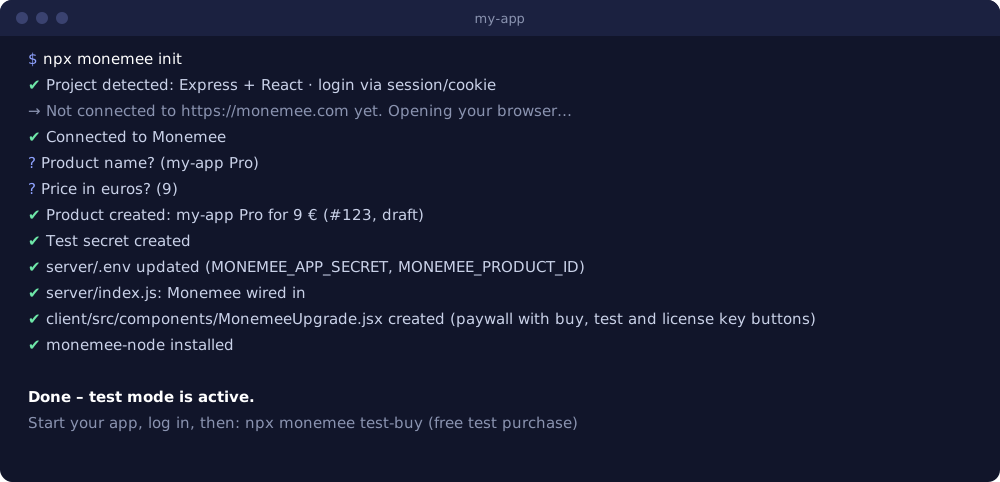
npx monemee init
The CLI logs you in through the browser, creates the product, writes your .env and wires Monemee into your code. Everything starts in test mode, so you can try the purchase flow without real money: a test purchase skips the payment step, and everything from the return to your app on is real.
Choose your path
| Your app | Guide | Package |
|---|---|---|
| Web app with login (Express, Next.js, React) | Add a paywall | monemee-node, monemee-react |
| Desktop or downloadable software (Electron, Tauri, extensions, CLIs) | Validate license keys | monemee-client |
| Python tool or Flask, FastAPI, Django app | Python | monemee on PyPI |
| Releases from GitHub | Deliver updates | GitHub Action |
Step-by-step guides cover Next.js, Express and React, Electron, Tauri, Chrome extensions, Python and testing without paying.
What Monemee handles for you
- Checkout and payments. A buy link per product; card payments run through Stripe.
- Unlock after purchase. Buyers return to your app already unlocked, without copying a key.
- License keys. Generation, delivery by email, device limits, expiry dates and plan names.
- Refunds. A refund revokes access automatically, instantly with webhooks.
- Offline licensing. Responses are signed with Ed25519, so apps keep working without a connection.
- Updates. New releases reach existing buyers through the download links they already have.
How a purchase works
- Your app links to the checkout with the current user attached.
- The buyer pays. Monemee issues a license and redirects back with a one-time token.
- Your server redeems the token with its app secret, binding the license to that user.
- From then on
hasAccess(userId)returnstrueuntil a refund or expiry.
Pricing
The SDK is free and MIT licensed. Monemee charges a fee per sale that drops from 29% to 9% as your revenue grows. There is no monthly fee.
Last updated: